Coming soon

Nomad

Stay on the right side of the Schengen 90/180 rule

Ships on the App Store as Nomad — Day Tracker

Nomad is a private, offline-first iOS app that helps digital nomads, expats, and frequent travellers stay compliant with visa and residency rules — most importantly the Schengen 90/180-day rule and per-country day limits.

Private by design

No account, no backend, no networking, no analytics, no location tracking. Everything stays on your device.

A look inside

Nomad — Overview

Overview

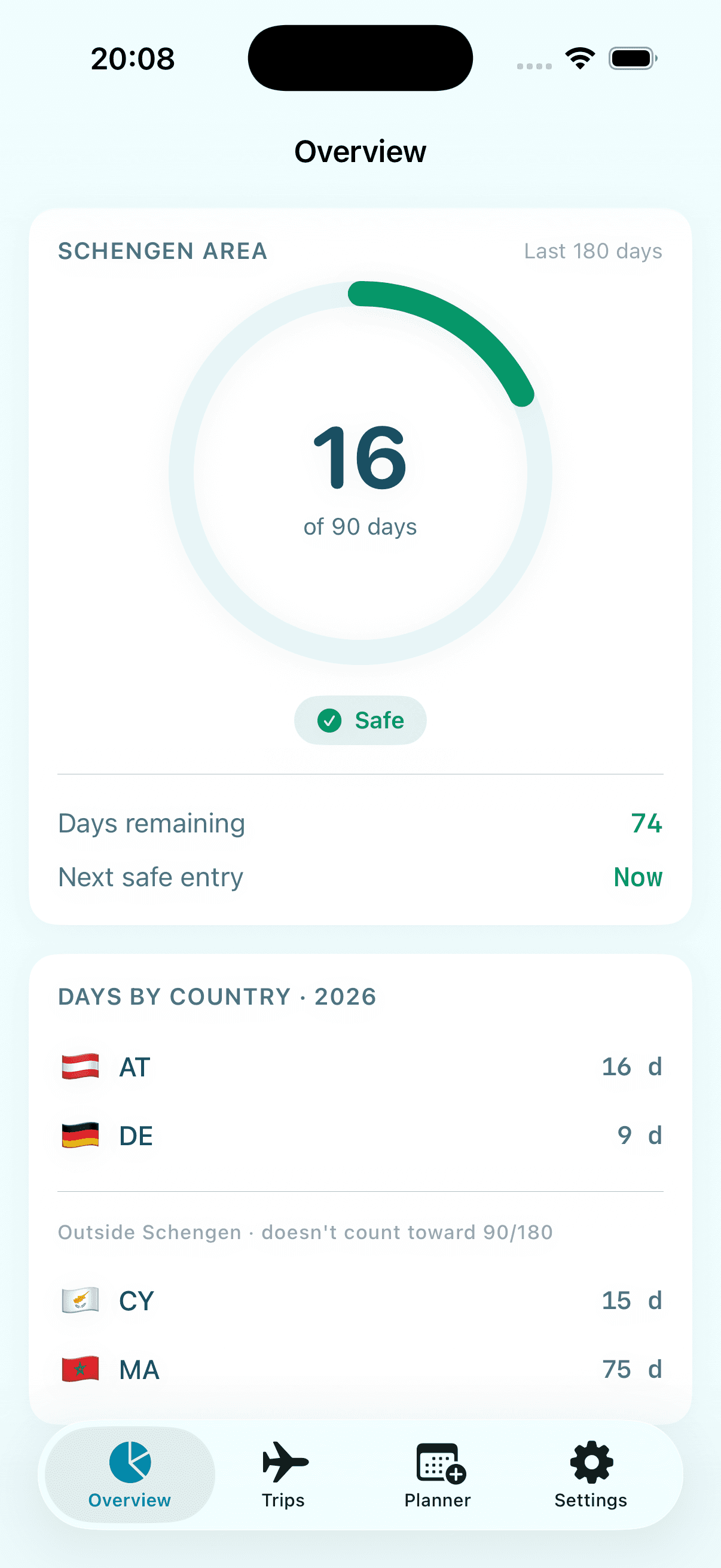
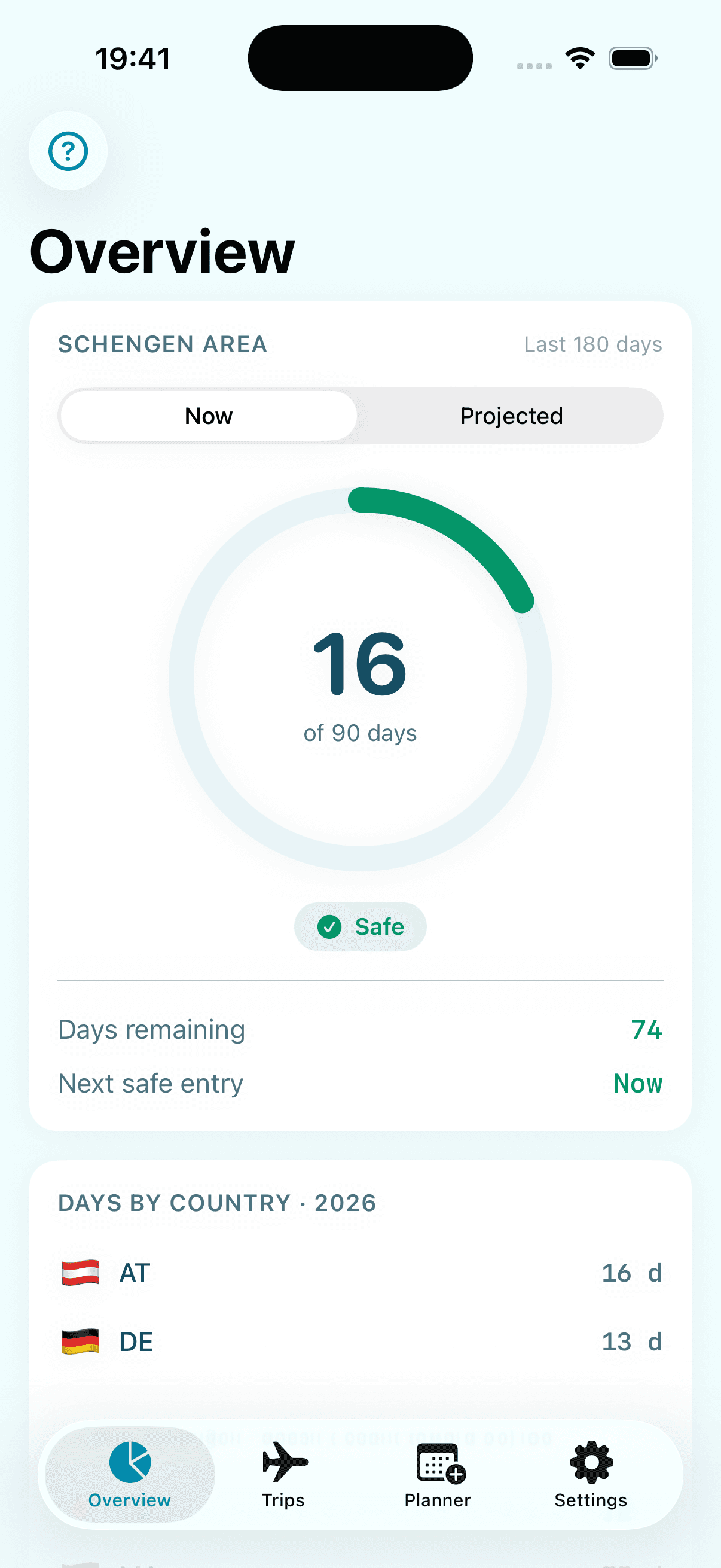
See exactly where you stand the moment you open the app — your Schengen usage, risk level, and days by country for the year.

  • Schengen 90/180: days used across any rolling 180-day window, your risk level, and the next date it's legal to re-enter.
  • Per-country day counters, grouped into Schengen (counts toward 90/180) and non-Schengen (doesn't).
  • A home-screen widget mirrors the same status — days used, days remaining, and next safe entry.
Nomad — Trips

Trips

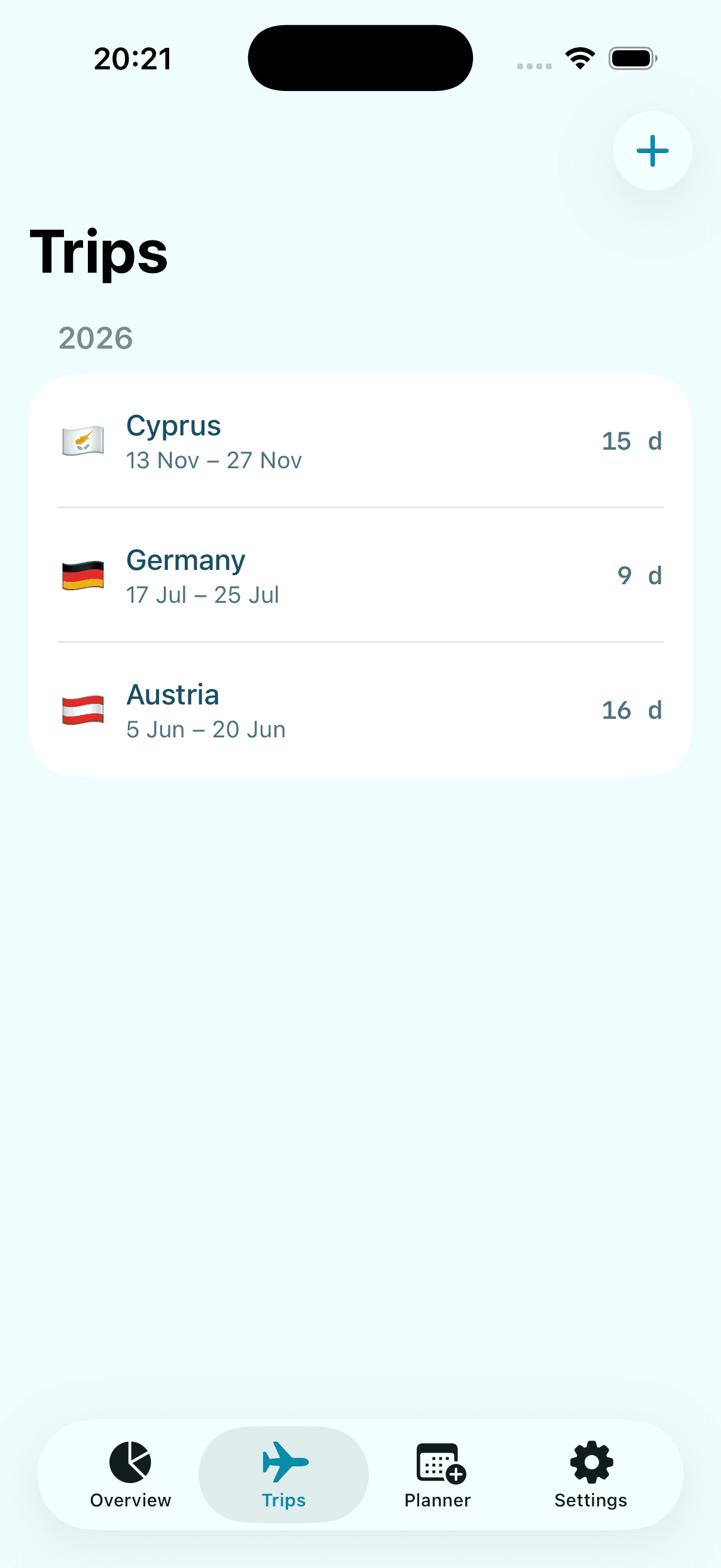
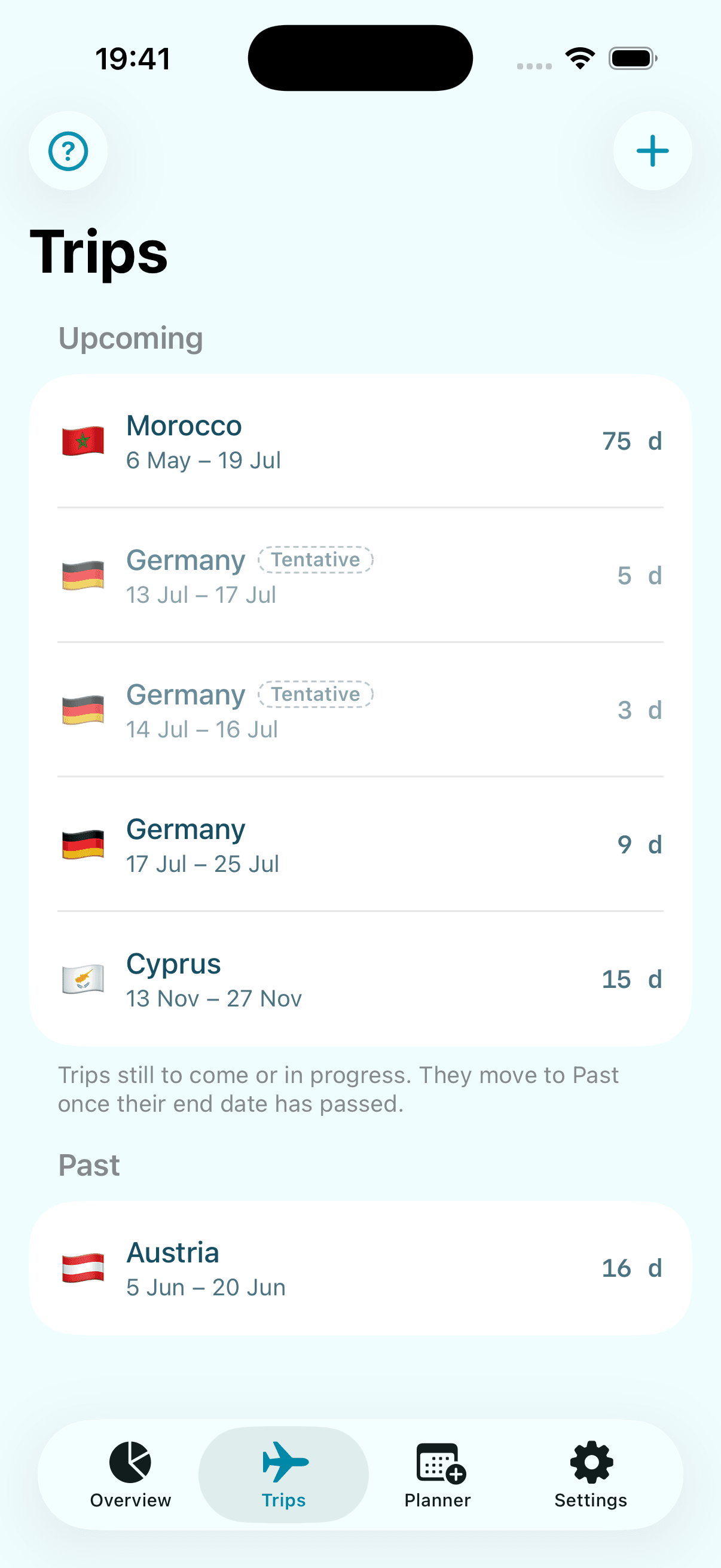
Log every trip once and let Nomad do the counting — past trips already count, upcoming ones don't yet.

  • Add, edit, and delete trips, split into upcoming and past, with live Schengen feedback as you type.
  • Export all your trips as a CSV spreadsheet via the share sheet — generated on device, nothing uploaded.
Nomad — Planner

Planner

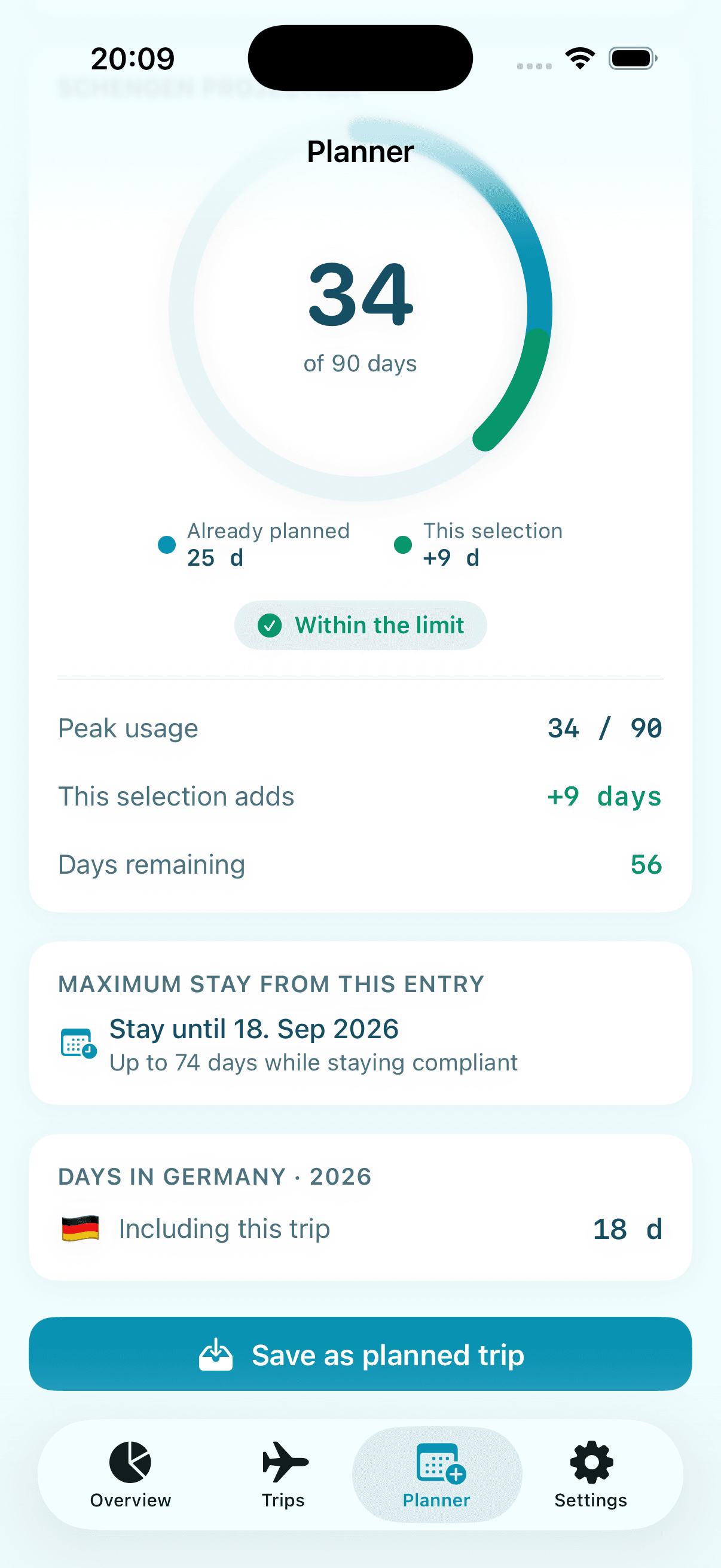
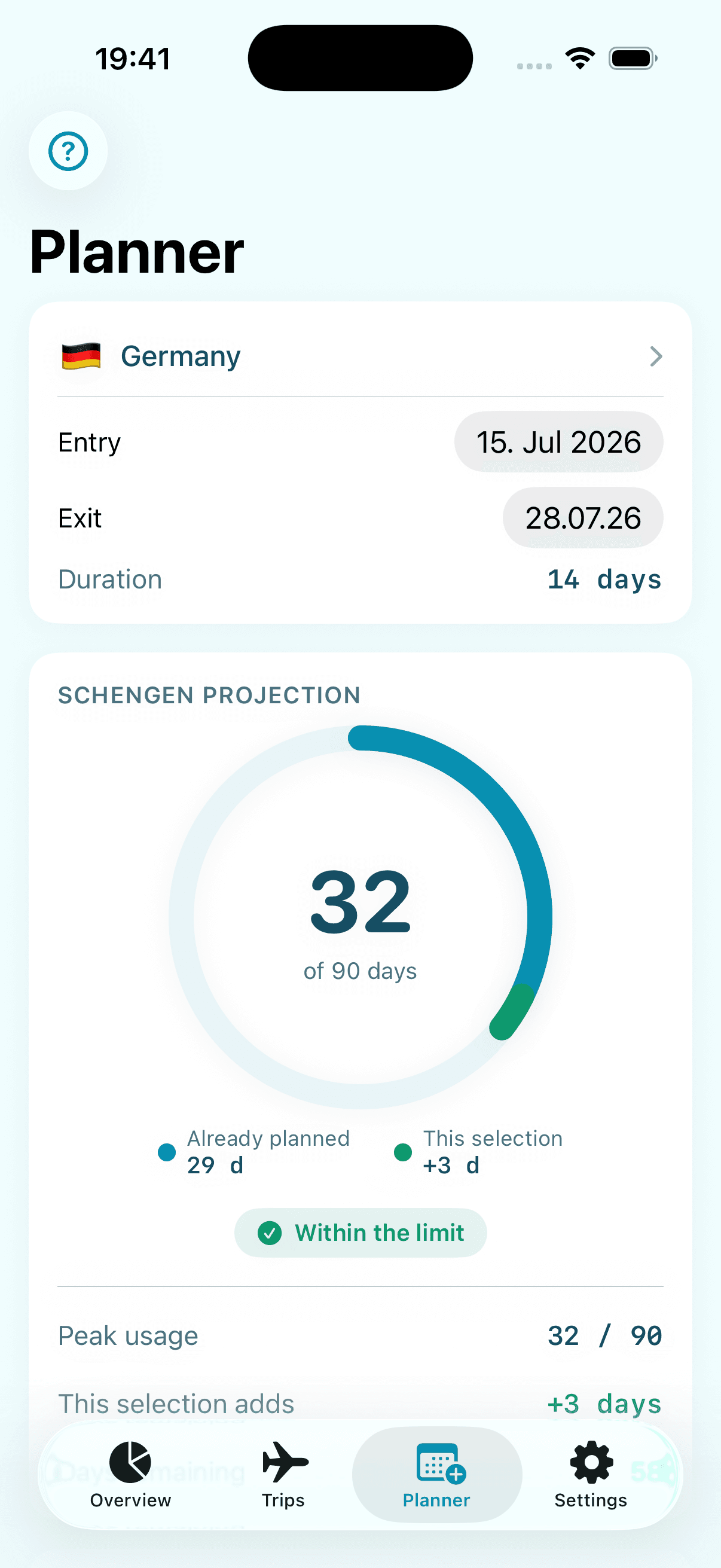
Model a trip before you book it and see whether it keeps you compliant.

  • Projected Schengen usage on a two-segment ring — days already planned versus what this trip adds.
  • The maximum compliant stay from a given entry date, so you know how long you can safely stay.
  • Custom per-country limits (for example 183 days for tax residency) surface here if a trip would breach one.

How to use

The Schengen 90/180 rule

As a visa-free visitor you may spend at most 90 days inside the Schengen Area within any rolling 180-day window. There's no annual reset — on any given day, Nomad looks back over the previous 180 days and adds up how many of them you spent in Schengen.

Per-country limits

Individual countries may also cap how long you can stay within a calendar year — often for tax-residency reasons (the well-known 183-day line) or under a long-stay visa. You set these limits yourself in Settings.

Nomad gives you estimates to plan with, not legal advice. Always confirm your situation with official sources or an immigration professional before making decisions.

  1. 1

    Log your trips

    Add each trip with its country and entry and exit dates, plus an optional note. Turn on “Planned” for a future trip you're holding a spot for — a live Schengen check appears as you edit.

  2. 2

    Check your status

    Overview shows your Schengen ring for the rolling 180-day window, a colour-coded risk badge, days remaining, the next date it's safe to re-enter, and a day count for every country.

  3. 3

    Test before you book

    Use Planner to model a trip before booking it. See its projected impact on your 90 days, the earliest safe entry, and the longest you could stay from a given date — nothing is saved until you choose to.

  4. 4

    Set your own limits

    In Settings, add a per-calendar-year cap for any country — 90, 120, 183, or 270 days, or a custom number. It then appears as a progress bar on Overview and in the Planner.

  5. 5

    Export anytime

    Turn your whole trip log into a CSV spreadsheet from Settings, generated on your device and shared however you like — handy for an accountant or immigration adviser.

The complete guide

Before you start:

The Schengen 90/180 rule: as a visa-free visitor you may spend at most 90 days inside the Schengen Area within any rolling 180-day window. "Rolling" is the tricky part — there's no annual reset. On any given day, look back over the previous 180 days: the days you spent in Schengen during that stretch must total 90 or fewer.

Per-country limits: separately, individual countries may cap how long you can stay in a calendar year — most often for tax-residency reasons (the well-known 183-day line) or under the terms of a long-stay visa. These are limits you set yourself in the app.

⚠️ Nomad gives you estimates to plan with, not legal advice. Always confirm your situation with official sources or an immigration professional before making decisions.

The four tabs

Overview
Nomad — Overview
Your current Schengen status and per-country day totals for the year.
Trips
Nomad — Trips
The log of every trip you've taken or planned — add, edit, delete.
Planner
Nomad — Planner
A what-if sandbox: model a future trip and see if it would break a limit.
Settings
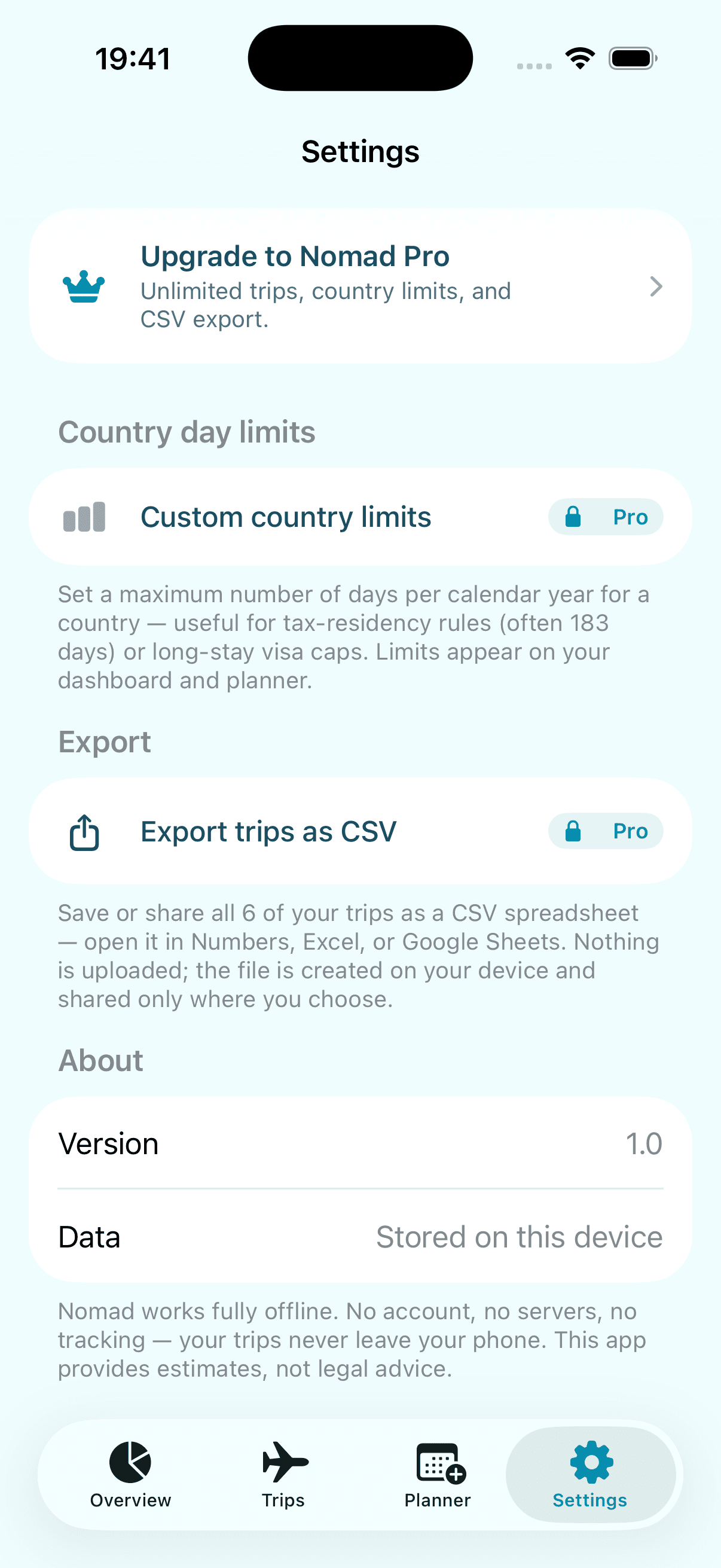
Nomad — Settings
Set custom per-country day limits and read the privacy notes.
Overview — your compliance at a glance

The Overview tab is your home base. It answers one question: am I okay right now?

The Schengen ring

Shows how many of your 90 days you've used inside the rolling 180-day window ending today. The number in the centre is days used; the arc fills as you approach the limit.

The risk badge

Under the ring, colour-codes your status based on days used:

  • SafeComfortable headroom — 0 to 75 days used.
  • WarningGetting close, plan carefully — 76 to 90 days used.
  • Over LimitYou've exceeded 90 days — 91 or more days used.

Days remaining

Tells you how many more Schengen days you have right now.

Next safe entry

Shows either "Now" (you're free to enter today) or a future date — the earliest day on which entering Schengen would be compliant, once enough older days have rolled out of the window.

Days by country

Lists each country you've spent time in this calendar year, with a day count. If you've set a limit for a country in Settings, a small progress bar appears: green well under the cap, amber as you near it, red once you're over.

If you haven't added any trips yet, this screen shows a gentle prompt to get started.

Trips — logging where you've been

The Trips tab is the source of truth. Every calculation in the app is built from the trips you record here.

Adding a trip

  1. Tap the ➕ button (top right).
  2. Country — tap to open the picker. Start typing to search; Schengen countries are tagged so you can spot them. Tap a country to select it.
  3. Entry date and Exit date — pick the day you arrived and the day you left. Both days count. For a same-day trip, set entry and exit to the same date — that counts as 1 day.
  4. Note (optional) — a reminder to yourself, e.g. "conference" or "visa run".
  5. Planned trip — leave this off for a trip that already happened; turn it on for a future trip you're holding a spot for.
  6. If you picked a Schengen country, a live Schengen check appears as you edit, showing whether this trip keeps you within the limit.
  7. Tap Save.

The exit date can never be earlier than the entry date. If you move the entry date past the current exit date, the exit date moves with it automatically.

Viewing and editing

Trips are grouped by year, newest first. Each row shows the country flag, name, date range, and day count. Planned trips carry a "Planned" badge.

  • Edit — tap any trip to reopen the form.
  • Delete — swipe a trip left and tap delete.

Changes flow through to the Overview and Planner immediately.

Free tier: you can log up to 10 trips for free. Removing the cap for unlimited history is part of Nomad Pro.

Planner — testing a trip before you book

The Planner is a sandbox. Nothing here is saved until you choose to save it, so experiment freely.

How to use it

  1. Pick a country, an entry date, and an exit date — just like adding a trip.
  2. The planner instantly shows the impact.

For Schengen countries, you'll see:

  • The projection ring — a cyan arc for days already accounted for by trips you've previously planned, and a green arc for the extra days this selection would add on top. If the combined total would exceed 90, the added arc turns red.
  • Peak usage — the highest the rolling-window total reaches across this trip (used / 90).
  • This selection adds — the marginal days on top of what you'd already planned.
  • Days remaining — what's left of your 90 after this trip.
  • Earliest safe entry — shown only if the trip would put you over; the first date you could instead enter compliantly.
  • Maximum stay from this entry — given your existing trips, the latest date you could stay until from your chosen entry date while remaining compliant, and how many days that is.

For non-Schengen countries, a note reminds you the trip doesn't count toward the 90/180 limit.

For every country, a "Days in [country] · [year]" card shows your projected total for the calendar year, measured against any limit you've set — turning red if the plan would exceed it.

Saving a plan

Happy with the scenario? Tap "Save as planned trip". It's added to your Trips list as a planned trip (editable later), and the planner resets so you can model the next leg.

Subset tip: if you've already planned, say, July 3–10 and then model July 3–7, the planner still reports the full 8-day impact — it knows the shorter trip sits inside one you've already planned, so it won't under-count.


Settings — custom country limits

Some countries cap your stay per calendar year. The Settings tab is where you record those caps so they show up across the app.

Custom country limits are a Nomad Pro feature. Without Pro, the section shows a locked Pro row that opens the upgrade screen.

Adding a limit

  1. In Country day limits, tap Add a country limit.
  2. Choose the country.
  3. Enter the maximum days per calendar year, or tap a preset:
    • 90 common short-stay visa cap
    • 120 a typical reduced cap
    • 183 the usual tax-residency threshold
    • 270 a longer long-stay allowance
  4. Tap Save.

Each country can have one limit. Adding a limit for a country you've already configured updates the existing one.

  • Edit — tap a limit to change the number of days.
  • Delete — swipe a limit left and tap delete.

Once set, the limit appears as a progress bar on the Overview country list and as a projected / limit readout in the Planner.

About section

A reminder of how the app handles your data: fully offline, no account, no servers, no tracking — and that it provides estimates, not legal advice.

Exporting your trips

Want a backup, or need to share your travel history with an accountant or immigration adviser? The Export section in Settings turns your whole trip log into a CSV spreadsheet.

  1. Open Settings and find the Export section.
  2. Tap Export trips as CSV.
  3. The system share sheet opens — save the file to Files, send it via Mail or Messages, or open it directly in Numbers, Excel, or Google Sheets.

The file is named NomadCompliance-Trips-YYYY-MM-DD.csv (dated for the day you export) and contains one row per trip with these columns:

ColumnMeaning
Country CodeISO country code, e.g. DE
CountryFull country name
Entry Date / Exit DateYYYY-MM-DD, in UTC
DaysInclusive day count for the trip
TypeConfirmed or Planned
NoteWhatever you jotted on the trip

Rows are ordered oldest-first. The file is generated on your device the moment you tap export — nothing is uploaded, and it only goes wherever you choose to send it.

The Export button only appears once you have at least one trip logged. CSV export is a Nomad Pro feature.

Nomad Pro

Core Schengen tracking and the planner are free — for up to 10 trips. Nomad Pro is a single one-time purchase that unlocks:

  • Unlimited trips — no cap on how much history you log.
  • Custom country limits — set per-country day caps for tax-residency or long-stay visa rules.
  • CSV export — save or share your full trip history as a spreadsheet.

It's a one-time purchase — not a subscription. You pay once and it's yours forever.

Upgrading

  1. Open Settings and tap Upgrade to Nomad Pro (or tap any locked Pro row).
  2. Review what's included and the one-time price.
  3. Tap Unlock Nomad Pro and confirm with Face ID / Touch ID / your Apple ID.

Once the purchase completes, the paywall closes and everything unlocks immediately. Settings then shows Nomad Pro active.

Restoring

Already bought Nomad Pro — on this device or another signed into the same Apple ID? Open the paywall and tap Restore purchases.

Payment

Payment is charged to your Apple ID at purchase. Because it's a one-time purchase, nothing renews — there's nothing to cancel. The app itself never sees your payment details.

Nomad Pro is handled entirely through Apple's In-App Purchase system. There's still no account and no server — your entitlement lives with your Apple ID, and your trip data never leaves the device.

Terms & Conditions

Nomad Pro is a one-time in-app purchase handled by Apple, and the app never sees your payment details or your trip data. Read the full terms for the details.

Read Nomad's Terms & Conditions
HomeAppsAboutContact